
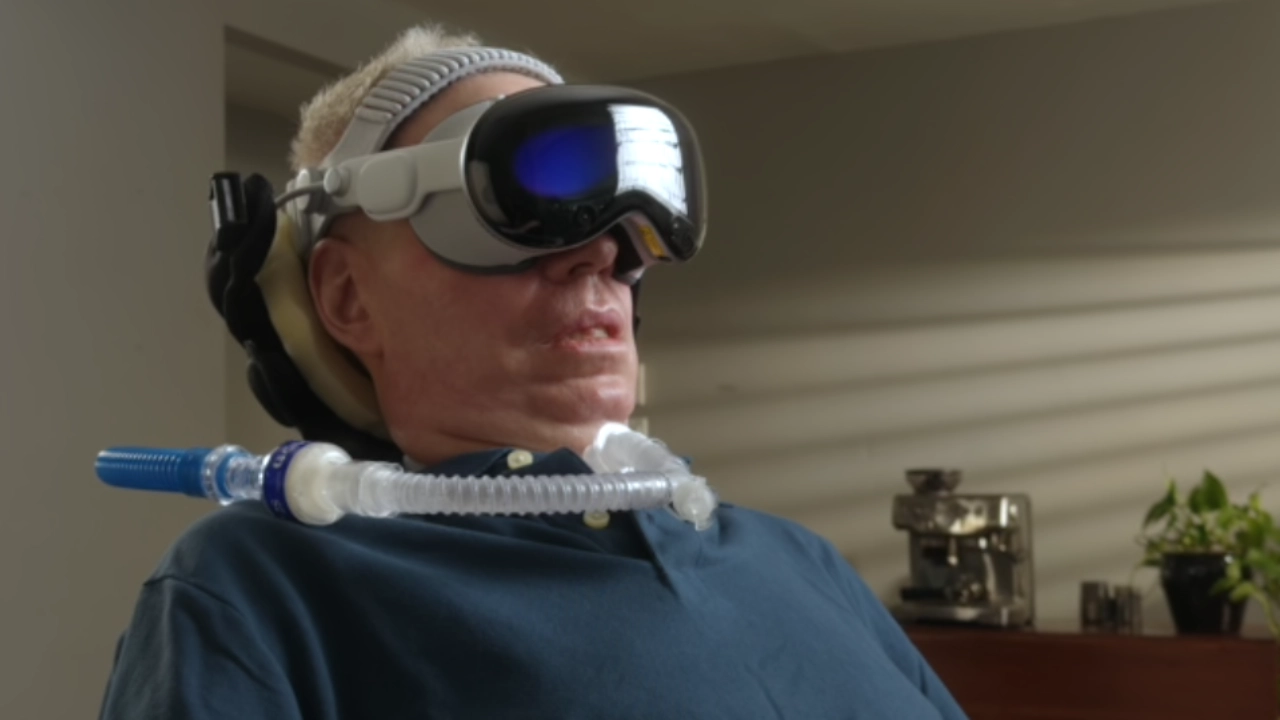
It isn’t about generating images, summarizing emails, or competing with ChatGPT. It’s about a person with ALS navigating their power wheelchair through a hospital corridor using only their eyes. It’s about a blind parent finally understanding what’s in a photo their child just sent them. It’s about a teenager with dyslexia being able to actually read a scientific paper — on their own terms, at their own pace.
Apple emphasized that these updates are part of a broader commitment to inclusive design. As Tim Cook noted, the company continues to focus on building accessibility features with privacy at their core, ensuring that powerful AI capabilities remain deeply personal and secure.
Sarah Herrlinger also highlighted that these improvements are designed to give users more intuitive ways to interact with technology — from personalized input methods to smarter content exploration — while maintaining Apple’s long-standing privacy-first approach.
That’s the version of Apple Intelligence that Apple previewed this year, and it may prove to be the company’s most consequential AI work yet.
While the broader tech industry continues to chase headlines with flashy generative AI demos, Apple has been quietly embedding artificial intelligence into the fabric of its accessibility ecosystem. The result is a sweeping set of updates across iPhone, iPad, Mac, Apple TV, and Apple Vision Pro that fundamentally rethink what assistive technology can be — not just a workaround, but a genuinely intelligent layer that adapts to individual human needs.
These aren’t incremental software tweaks. They’re a signal that accessible computing is entering a new era.
Key Highlights
- Apple Intelligence powers major upgrades to VoiceOver, Magnifier, Voice Control, and Accessibility Reader
- VoiceOver now offers detailed, context-rich descriptions of photos, documents, bills, and forms
- Voice Control supports natural language navigation — describe what you see, not what a developer labeled it
- AI-generated subtitles arrive system-wide for personal videos, streams, and uncaptioned content
- Apple Vision Pro enables eye-controlled power wheelchair navigation via Tolt and LUCI drive systems
- All core AI processing happens on-device, keeping sensitive accessibility data private
- Updates arrive across iPhone, iPad, Mac, Apple TV, and Apple Vision Pro later this year
- New hardware support includes Sony Access Controller compatibility and the Hikawa Grip & Stand MagSafe accessory
From Labels to Understanding: The Core Shift in Apple’s Accessibility Approach
To appreciate what Apple announced, you first have to understand why traditional assistive technology has always had a ceiling.
Most screen readers, voice controls, and accessibility tools were built to make interfaces usable — not to make them understandable. They could tell you a button existed, but not what it meant in context. They could read a label, but not interpret what was actually on screen.
Apple Intelligence changes that equation entirely.
Instead of responding to rigid commands or fixed interface labels, Apple’s updated accessibility tools can now analyze visual environments, interpret natural language intent, summarize complex content, and engage in something that genuinely resembles conversation. The shift — from label-reading to contextual understanding — sounds subtle. In practice, it’s the difference between a tool that makes technology accessible and one that makes the world accessible.
Nowhere is this more visible than in the updates to four of Apple’s most-used accessibility tools.
VoiceOver and Magnifier: Finally, a Screen Reader That Sees the Bigger Picture
For users who are blind or have low vision, VoiceOver has long been the primary gateway to everything Apple devices can do. It’s powerful — but it’s always been constrained by what developers chose to label and how thoroughly they chose to describe it.
With Apple Intelligence, that constraint starts to dissolve.
VoiceOver can now generate significantly more detailed image descriptions across the entire system. That includes personal photographs, scanned documents, utility bills, medical forms, and legal records — content that users deal with constantly but that traditional screen readers have never handled with much nuance.
More importantly, Apple is expanding what it calls Live Recognition into genuine conversational territory.
Using the Action button on recent iPhone models, users can point their camera at literally anything around them and ask follow-up questions in plain language. Want to know if that’s a ten-dollar bill or a twenty? Ask. Need to check the expiration date on a medication bottle? Ask. Trying to figure out whether a document is the one you need before reading the whole thing? Ask.
This isn’t a gimmick — it’s a meaningful leap toward independence that doesn’t require a caregiver, a sighted friend, or a slow manual process.
Also Read: Walmart Onn Android 16 Tablets (2026): Full Specs, Honest Analysis & Who Should Buy Each Model
Magnifier receives many of the same upgrades, wrapped in a high-contrast interface built specifically for low-vision users. Voice commands like “zoom in” and “turn on flashlight” make navigation fluid without requiring physical precision, which matters enormously for users managing both vision and motor challenges simultaneously.
Voice Control Gets Smarter — and More Human
Voice navigation has historically had a frustrating paradox at its core: to use it effectively, you often needed to already know exactly how an app was structured.
To tap a button, you had to know what a developer named that button. To open a section, you had to know its precise label. Miss the label, and the command fails. For users who rely on voice navigation for everything — because motor disabilities make touch impossible — that kind of friction is exhausting.
Apple’s updated Voice Control removes it.
With Apple Intelligence, users can now describe interface elements the way a sighted person would naturally talk about them. “Tap the purple folder.” “Open the guide about restaurants.” “Click the blue button at the bottom.” The system interprets what you mean, not just what a developer typed.
This matters on two levels.
First, it dramatically reduces the cognitive load for users with physical disabilities. Remembering exact interface labels is a skill set users shouldn’t need just to use an app.
Second — and this is underappreciated — it compensates for poorly built apps. Third-party developers are notoriously inconsistent about accessibility labeling. Apple’s natural language interpretation layer essentially acts as an intelligent bridge between human intent and whatever interface the developer actually built. It’s not just an accessibility upgrade. It’s a reliability upgrade for accessibility as a whole.
Accessibility Reader: Making Complex Content Actually Approachable
Reading on a screen has always been harder for some people than developers assume.
Whether you’re dealing with dyslexia, low vision, cognitive differences, sensory processing sensitivities, or language barriers, the modern web — with its inconsistent fonts, cluttered layouts, autoplay videos, and wall-to-wall ads — can be genuinely overwhelming to navigate.
Apple’s updated Accessibility Reader takes this seriously.
The redesigned tool now handles complex document formats that previous versions struggled with: multi-column academic articles, scientific papers, image-heavy reports, data tables, and mixed-format content that breaks most reading tools. More practically, it respects user-defined formatting preferences — custom fonts, high-contrast colors, and personalized text sizes — even while processing and reorganizing the content itself.
Two new features stand out.
AI-generated summaries let readers preview the core ideas of lengthy content before committing to the full text. For students, researchers, professionals, and anyone with limited cognitive bandwidth on a given day, this is genuinely useful — not a shortcut, but a scaffold.
Built-in translation, meanwhile, preserves the user’s accessibility formatting while converting content into their native language. That combination is significant: millions of people globally navigate both accessibility challenges and language barriers simultaneously. Addressing both together, without forcing a choice between them, reflects a kind of thoughtfulness that’s easy to overlook in a feature announcement but matters enormously in real use.
AI-Generated Subtitles: Solving the Captioning Gap Where It Actually Exists
Captions on Netflix are good now. Captions on most major streaming platforms are passable. But the world isn’t just Netflix.
It’s the video your cousin sent from a family gathering. The tutorial a small creator posted without captions. The local news stream running without closed captions enabled. The corporate training video from 2019 that nobody ever got around to transcribing.
For the 1.5 billion people worldwide living with some degree of hearing loss, this gap in informal and personal video content is a daily reality.
Apple’s new generated subtitles feature addresses exactly this.
Using on-device speech recognition, Apple devices will automatically generate subtitles for personal videos, friend-shared clips, online streams, and any uncaptioned media — across iPhone, iPad, Mac, Apple TV, and Apple Vision Pro. No upload required. No third-party service. No waiting.
The privacy dimension here isn’t incidental — it’s central to why this approach works. Because processing happens entirely on-device, users never have to weigh accessibility against privacy. Their personal videos stay personal. That trade-off shouldn’t have to exist, and increasingly, Apple is designed so it doesn’t.
Apple Vision Pro and Wheelchair Control: Spatial Computing as Medical-Grade Assistive Technology
The single most remarkable announcement in Apple’s accessibility preview involves power wheelchairs.
Apple Vision Pro’s eye-tracking system — already precise enough to navigate complex spatial interfaces — is now being applied to wheelchair control. For individuals who cannot operate traditional joysticks due to ALS, spinal cord injuries, muscular dystrophy, or other conditions affecting motor control, eye-driven navigation offers a level of independence that’s genuinely life-changing.
At launch, the feature supports two alternative drive systems: Tolt and LUCI, both available in the United States. The system connects via both Bluetooth and wired connections and is designed to maintain accurate tracking across varied lighting conditions without constant recalibration — a point Apple specifically highlighted because recalibration fatigue has historically been a significant barrier with older eye-tracking systems.
It’s worth pausing on what this represents beyond the feature itself.
Apple Vision Pro has spent most of its public life being discussed as a creative tool, a productivity device, or a very expensive curiosity for early adopters. Wheelchair control reframes it entirely. At $3,499, cost remains a serious barrier — and that tension deserves honest acknowledgment. But the fact that spatial computing hardware can now function as a legitimate medical-assistive device changes the long-term conversation about what this category of technology is actually for.
Wearable computing as an assistive platform isn’t a niche use case. For a meaningful portion of the population, it may eventually be the primary use case.
Additional Updates Worth Knowing
Beyond the headline features, Apple introduced several meaningful improvements that further strengthen its accessibility ecosystem:
- Touch Accommodations enhancements bring more flexibility to iOS and iPadOS, allowing users to better customize how their devices respond to touch input — particularly useful for individuals with motor control challenges.
- Made-for-iPhone hearing aids now pair and switch between Apple devices more seamlessly, improving reliability across iPhone, iPad, Mac, and Apple TV. The setup process has also been simplified to reduce friction for users.
- Vision Pro interaction upgrades include new face gesture controls for performing system actions, along with improved eye-based selection using Dwell Control — expanding hands-free interaction possibilities.
- Vehicle Motion Cues for visionOS help reduce motion sickness when using Apple Vision Pro in moving vehicles, addressing a commonly overlooked accessibility barrier.
- Larger Text support on Apple TV ensures better readability for users with low vision, bringing the living room experience closer to the accessibility standards already seen on iPhone and iPad.
- Name Recognition expansion now supports over 50 languages, helping users who are deaf or hard of hearing stay aware when someone calls their name in diverse real-world environments.
Expert Analysis: Apple Is Building Something the Rest of the Industry Isn’t
The broader AI industry in 2025 is largely fixated on three things: generating content faster, answering questions more accurately, and winning enterprise contracts. These are legitimate goals, but they share a common assumption — that the primary user of AI is someone who can already navigate technology without significant friction.
Apple’s accessibility work challenges that assumption directly.
On the strategic level, these updates reveal that Apple Intelligence is not a standalone product layer — it’s infrastructure. The same models that power writing suggestions and photo organization are being deployed to solve problems that traditional software simply couldn’t address. That integration approach reduces friction for users and creates compounding value across the ecosystem as capabilities improve.
On the competitive level, privacy-first on-device AI is increasingly a differentiator that matters. As regulatory scrutiny of cloud-based AI grows across the EU, US, and other jurisdictions, Apple’s ability to deliver meaningful AI features without requiring data to leave the device becomes a genuine advantage — especially in healthcare and accessibility contexts where data sensitivity is highest.
Also Read: Save Up to $150 on Apple’s M5 MacBook Air: Is It the Best Laptop Deal Right Now?
On the product development level, Apple has long understood something that other companies pay lip service to: accessibility features become mainstream features. Live captions started as an accessibility tool. Voice control started as an accessibility tool. Eye tracking started as an accessibility tool. The pattern repeats itself because designing for the edges of human capability tends to produce interfaces that work better for everyone.
The wheelchair navigation announcement extends that pattern into physical computing. Eye-controlled interfaces that work reliably enough to navigate a power wheelchair will eventually find applications in automotive interfaces, surgical environments, hands-free industrial settings, and consumer VR — regardless of whether the user has a motor disability.
On the human level, the most important thing to say is this: these features don’t exist because they’re strategically clever, though they are. They exist because there are real people for whom a more detailed image description, a more natural voice command, or a more reliable eye-tracking system represents a meaningful improvement in daily life. That’s the standard by which they should be evaluated — and by that standard, Apple’s latest accessibility push is genuinely impressive.
Pros and Cons
Pros
- Deep, system-wide AI integration rather than isolated assistive tools
- On-device processing protects sensitive accessibility-related data
- Natural language interaction reduces the learning curve significantly
- Cross-device consistency across iPhone, iPad, Mac, Apple TV, and Vision Pro
- VoiceOver and Magnifier upgrades represent major leaps for blind and low-vision users
- Wheelchair control via Vision Pro expands independence for users with severe motor limitations
- FaceTime API opens real sign language interpretation possibilities for Deaf users
- Hikawa accessory shows commitment to hardware, not just software, accessibility
Cons
- Most advanced Apple Intelligence features will require newer hardware (A17 Pro / M1 and later)
- Apple Vision Pro’s $3,499 price makes wheelchair control inaccessible for many who need it most
- Wheelchair drive system compatibility is limited at launch (US only, two systems)
- Broad rollout timing (“later this year”) lacks specificity
- Third-party developer adoption of new APIs (like FaceTime interpretation) will determine real-world impact
Future Impact: Where Accessibility and AI Are Headed Together
Apple’s 2025 accessibility announcements are meaningful in isolation — but they’re more significant as directional signals.
The trajectory points toward a model of adaptive computing: devices that don’t just respond to input, but actively adjust to the individual using them. We’re moving from interfaces that require users to adapt to technology, toward technology that adapts to users.
In the near term, expect improvements in on-device AI quality to make features like Live Recognition faster, more accurate, and more contextually aware. As Apple Silicon continues to advance, the gap between what’s possible on-device and what requires cloud processing will shrink further.
In the medium term, the FaceTime interpretation API and similar developer-facing tools could catalyze a generation of accessibility-forward third-party apps that Apple couldn’t build itself. The platform play matters as much as the first-party features.
In the longer term, the convergence of eye tracking, spatial computing, and on-device AI creates a foundation for assistive interfaces that most people haven’t yet imagined. Wheelchairs today. Augmentative communication devices, prosthetic control interfaces, and adaptive educational tools tomorrow.
For the disability community, for caregivers, for accessibility advocates, and for anyone who believes that technology should work for everyone — this is a space worth watching closely.
Frequently Asked Questions
What is Apple Intelligence, and how does it relate to accessibility? Apple Intelligence is Apple’s on-device AI system, integrated across iPhone, iPad, Mac, and Apple Vision Pro. Rather than operating as a separate app or feature, it enhances existing tools — including VoiceOver, Magnifier, Voice Control, and Accessibility Reader — with deeper contextual understanding, natural language interaction, and AI-generated content like image descriptions and subtitles.
Which Apple devices will support the new accessibility features? Most features will require devices with Apple’s Neural Engine, generally found in the A17 Pro chip (iPhone 15 Pro and later) and M1 chips or later for iPad and Mac. Apple has not yet published a definitive hardware compatibility list.
Can Apple Vision Pro really control a power wheelchair with eye tracking? Yes. Apple is partnering with Tolt and LUCI, two established alternative drive system providers, to enable compatible power wheelchairs to be controlled via Vision Pro’s eye-tracking hardware. The system is designed to work across different lighting conditions without constant recalibration and supports both Bluetooth and wired connections.
Do the new AI-generated subtitles work offline? Yes. Subtitle generation uses on-device speech recognition, meaning it works without an internet connection and without uploading any audio or video data to Apple’s servers. Your personal videos stay private.
How is the new Voice Control different from what existed before? Previous Voice Control required users to use exact interface labels or button names to navigate apps. The updated system allows natural language descriptions — “tap the purple folder,” “scroll to the bottom,” “open the settings menu” — so users can navigate by describing what they see rather than memorizing developer-assigned labels.
What is the Hikawa Grip & Stand, and who is it for?
Apple’s accessibility push isn’t limited to software. The newly expanded availability of the Hikawa Grip & Stand reflects a deeper commitment to inclusive hardware design.
Created by Los Angeles-based designer Bailey Hikawa, the accessory was developed in collaboration with individuals who experience challenges with grip strength and mobility. It offers multiple ways to securely hold or position an iPhone, adapting to different physical needs.
Now available globally through Apple’s online store, the accessory comes in multiple vibrant color options and is part of a broader collaboration with PopSockets — marking its first wide-scale release.
This kind of hardware innovation reinforces an important idea: accessibility isn’t just about what software can do, but how devices physically fit into people’s lives.
When will these features be available? Apple has indicated that the new accessibility features will roll out later in 2025, but has not provided specific release dates for individual features.
Apple is also extending this conversation beyond software updates. A special “Today at Apple” session at Apple The Grove in Los Angeles will feature discussions with accessibility advocates and creators, focusing on how inclusive design can shape more meaningful technology experiences.
Conclusion
There’s a temptation to evaluate Apple’s accessibility announcements through the same lens as every other AI product launch — to ask whether the demos were impressive, whether the features will ship on time, whether the pricing makes sense.
Those are fair questions. But they miss the more important point.
What Apple is building here isn’t just a better screen reader or a smarter voice command system. It’s a vision of computing where the friction between human intent and digital interaction gets smaller every year — where the technology meets the person, rather than the other way around.
Eye-controlled wheelchairs. Conversational visual assistance. Subtitles that appear automatically, privately, for the videos that matter most. Natural language navigation for anyone who couldn’t memorize an interface label. These aren’t edge cases. They’re demonstrations of what AI can accomplish when the goal is human capability rather than technological novelty.
In a crowded AI landscape full of impressive demos and questionable utility, Apple’s accessibility work stands out precisely because its value is concrete, its beneficiaries are real, and its direction is clear.
That’s a harder thing to build than a chatbot. And it’s worth paying attention to.
What Do You Think?
Apple’s latest accessibility features represent one of the most human-centered applications of AI we’ve seen from any major tech company. Whether you use assistive technology yourself, care for someone who does, or simply believe that good technology should work for everyone — this conversation matters.
Which feature stands out most to you? Is it the wheelchair control that expands physical independence? The natural language voice navigation that removes cognitive friction? The on-device subtitles that protect privacy while expanding access?
Share your perspective in the comments. If you found this breakdown useful, subscribe for ongoing coverage of accessibility technology, Apple Intelligence, and the future of inclusive design. And if someone in your life would benefit from knowing about these features, send it their way — that’s exactly the kind of sharing that makes this work worth doing.
Source: Apple Accessibility Preview Announcement (2026)